
OMG! Ubuntu! · @omgubuntu
572 followers · 977 posts · Server hello.2heng.xin
Firefox 117 Released With Minor (And I Mean Minor) Changes
Mozilla Firefox 117 is now rolling out to users across Windows, macOS, and Linux. But don’t get too excited about its arrival, okay? Given the rapid release cadence this browser uses, the days of blockbuster, feature-packed Firefox updates are long gone. We still get ace new features, but we get them in dribs and drabs over the course of a year, rather than in a a single, jaw-dropping release. Which is why updates like Firefox 117 may seem unexciting (though I’m not saying this is a bad thing, lest anyone jump me in the comments). Case in point? The headline :sys_more_orange:
#News #AppUpdates #Firefox
:sys_omgubuntu: https://www.omgubuntu.co.uk/2023/08/firefox-117-released
OMG! Ubuntu! · @omgubuntu
560 followers · 969 posts · Server hello.2heng.xin
WPS Office for Linux Gets New Look, Now Supports Ubuntu 22.04+
A new version to the free (but not open-source) WPS Office is available for Linux. It’s been an age since I last mentioned WPS Office on this blog. The main reason for this is I don’t use office software (and if I even need to, LibreOffice suffices). But I am not everyone; WPS Office has its fans – so this post for is for them, and for those interested in alternative Linux office suites. But before I run through “what’s new” in the latest WPS Office Linux release I should recap what WPS Office actually is. That way those who :sys_more_orange:
#News #AppUpdates #Office&ProductivityApps #WpsOffice
:sys_omgubuntu: https://www.omgubuntu.co.uk/2023/08/wps-office-for-linux-updated-2023
#news #AppUpdates #office #wpsoffice
OMG! Ubuntu! · @omgubuntu
522 followers · 959 posts · Server hello.2heng.xin
Thunderbird 115.1 Released with Bug Fixes & UI Buffs
The recent release of Thunderbird 115 (aka “Supernova”) seems to have gone down well with users of all shades, across all platforms — which is always nice to see. To keep things ticking over nicely a scheduled update to the open source email client is rolling out. The update brings a bunch of bug fixes to bear, plus a couple of minor UI tweaks. Thunderbird 115.1 hides the Quick Filter bar by default. I think this gives the e-mail client (in whatever layout you’re using) a sleeker presentation. Still it’s only hidden by default not removed; the Quick Filter bar :sys_more_orange:
#News #AppUpdates #Thunderbird
:sys_omgubuntu: https://www.omgubuntu.co.uk/2023/08/thunderbird-115-1-released-with-bug-fixes-ui-buffs
#news #AppUpdates #Thunderbird
OMG! Ubuntu! · @omgubuntu
516 followers · 955 posts · Server hello.2heng.xin
Mozilla Firefox 116 is Now Available to Download
A new month means and a new version of Mozilla Firefox is available to download. Firefox 116 carries a modest crop of changes that further refine and finesse the famed FOSS browser. Do you use Picture-in-Picture mode (PIP)? If so, you’ll notice that the pop-put window finally has a volume slider. This makes it easy to adjust the sound levels of whatever you’re watching without needing to affect system-wide volume levels – a nice little buff, I think. Sticking with video, Firefox 116 supposedly supports hardware-accelerated video playback on Raspberry Pi 4 for H.264 video content. As there are no :sys_more_orange:
#News #AppUpdates #Firefox
:sys_omgubuntu: https://www.omgubuntu.co.uk/2023/08/firefox-116-released
OMG! Ubuntu! · @omgubuntu
507 followers · 952 posts · Server hello.2heng.xin
GIMP Dev Release Completes GTK3 Port, Adds Headerbar Option
A new development version of GIMP recently released, and it’s a fairly notably one for a couple of reasons. Though not stable (i.e. expect bugs) this release gives us our best look yet at how what the stable GIMP 3.0 release will comprise of when it’s released later this year (a release candidate of GIMP 3.0 draws close, for those interested). First up, devs say GIMP’s GTK3 port is now “officially done”. If you’ve paid any attention to GIMP’s development efforts in the past few years you’ll know that porting the app to GTK3 has been a real fear. For :sys_more_orange:
#News #AppUpdates #Gimp
:sys_omgubuntu: https://www.omgubuntu.co.uk/2023/07/gimp-dev-release-completes-gtk3-port-adds-headerbar-option
OMG! Ubuntu! · @omgubuntu
500 followers · 950 posts · Server hello.2heng.xin
Thunderbird 115 Released with Major UI Changes
A brand new version of the Thunderbird email client is out – and it’s looking fire! Many of the major UI changes teased last year make their debut here in Thunderbird 115, which has been dubbed “Supernova” and is available to download for Windows, macOS, and Linux from July 11 from a beautifully revamped Thunderbird homepage. And the changes are more than skin deep. The client’s codebase has undergone extensive rebuilding in order to lay a “solid groundwork for future releases that will make Thunderbird a significantly better email client”, to quote Ryan Sipes, Thunderbird’s Product and Business Development Manager. :sys_more_orange:
#News #AppUpdates #Thunderbird
:sys_omgubuntu: https://www.omgubuntu.co.uk/2023/07/thunderbird-115-released
#news #AppUpdates #Thunderbird
OMG! Ubuntu! · @omgubuntu
487 followers · 946 posts · Server hello.2heng.xin
Firefox 115 Released with Intel GPU Video Decoding on Linux
A brand new version of the Mozilla Firefox web browser is rolling out — and it’s a real doozy. Linux users with Intel GPUs will be pleased to hear Mozilla Firefox 115 supports hardware video decoding by default. Most devices with Intel graphics hardware benefit from this feature, which is powered by the open-source Video Acceleration API (VA-API). Those on devices lacking platform support for H264 video decoding will benefit from a fallback to Cisco’s OpenH264 plugin when playing compatible content in this release and up. Linux users can also middle click on the new tab button to open clipboard :sys_more_orange:
#News #AppUpdates #Firefox
:sys_omgubuntu: https://www.omgubuntu.co.uk/2023/07/firefox-115-intel-gpu-video-decoding-on-linux
OMG! Ubuntu! · @omgubuntu
473 followers · 933 posts · Server hello.2heng.xin
Opera One, an AI-infused Web Browser, Hits Linux
I haven’t used the Opera web browser since… Well, forever – but I’m well aware it remains a innovating option for those fed up with Firefox, Chrome, et al. Today, June 20, Opera hit version 100 and, through the magic of marketing, transforms into Opera One. At least, that’s what I think us happening. The official press release says “Opera’s flagship browser today passes the baton to the brand-new Opera One on Windows, Mac and Linux.” — but the branding within the browser itself doesn’t use the “One” moniker. It’s still just called “Opera”. So, who knows. You might have :sys_more_orange:
#News #Ai #AppUpdates #Opera #WebBrowsers
:sys_omgubuntu: https://www.omgubuntu.co.uk/2023/06/opera-one-ai-browser-linux
#news #ai #AppUpdates #opera #webbrowsers
OMG! Ubuntu! · @omgubuntu
472 followers · 930 posts · Server hello.2heng.xin
ONLYOFFICE 7.4 Released with ChatGPT Plugin Support, New Draw Tools
Some neat improvements feature in the latest update to ONLYOFFICE, an open-source productivity suite for Windows, macOS, and Linux. As always I’m not shouting the name to annoy you, it’s simply how it’s stylised. ONLYOFFICE 7.4 features a host of tweaks throughout all three core components, including the ability to draw on presentation slides, text documents, forms, and spreadsheets. To do this select the newly added Draw tab and, providing you’ve got the skill, select a pen and colour then doodle away! You can select your drawing and move/manipulate it on a per-line basis (that is, each time you release :sys_more_orange:
#News #AppUpdates #Office&ProductivityApps #Onlyoffice
:sys_omgubuntu: https://www.omgubuntu.co.uk/2023/06/onlyoffice-desktop-editors-adds-chatgpt
#news #AppUpdates #office #onlyoffice
OMG! Ubuntu! · @omgubuntu
469 followers · 925 posts · Server hello.2heng.xin
Firefox 114 Released with Privacy Enhancements, FIDO2 Support
You know the deal: the world spins, a month passes, and a new version of Mozilla Firefox is released for Windows, macOS, and Linux. Firefox 114 arrives on schedule, with a few notable enhancements, a large dose of bug fixes, and additional web features that developers can take advantage of of. The “big ticket” item in this version? A new UI to manage the DNS over HTTPS exception list. While previous versions have supported this privacy-enhancing feature there are new new settings for it in the Privacy & Security panel, including n easy way to add sites to your exception :sys_more_orange:
#News #AppUpdates #Firefox
:sys_omgubuntu: https://www.omgubuntu.co.uk/2023/06/mozilla-firefox-114-released
OMG! Ubuntu! · @omgubuntu
465 followers · 918 posts · Server hello.2heng.xin
Tube Converter Gets New Backend for Improved Stability
A major update to Tube Converter is now available. If you’re not familiar with this GTK4/libadwaita app, it’s a GUI tool that makes it easy to download videos from YouTube (assuming you have permission, etc) and a number of other popular video streaming sites. Tube Converter is powered by the popular yt-dlp engine, providing a sleek, user-friendly front-end to many of that tool’s features. It lets you download multiple videos at a time in a variety of formats, including MP4 and WEBM, and audio-only MP3, FLAC, and WAV. Latest Tube Converter Features There have been a couple of sizeable updates :sys_more_orange:
#News #AppUpdates #GtkApps #TubeConverter #Youtube
:sys_omgubuntu: https://www.omgubuntu.co.uk/2023/05/tube-converter-linux-app-new-features
#news #AppUpdates #GtkApps #tubeconverter #youtube
OMG! Ubuntu! · @omgubuntu
449 followers · 878 posts · Server hello.2heng.xin
Mozilla Firefox 112 Released with Low-Key Iterative Improvements
The latest monthly release of Mozilla Firefox is available to download, right on schedule. Firefox 112 intros a handful of changes that gives some extra buffs to this brilliant open-source web-browser. Like what? Well, Mozilla mention the ability to right-click in a password field to access a ‘reveal password’ option. This sounds a bit of a strange addition, granted. But not all password fields pre-populated with your saved credentials offer an option to un-asterisk credentials, so it may be useful. Keeping with the “nice improvement, but I probably won’t use this” vein, Firefox 112 can import browser data from the :sys_more_orange:
#News #AppUpdates #Firefox
:sys_omgubuntu: https://www.omgubuntu.co.uk/2023/04/mozilla-firefox-112-released
OMG! Ubuntu! · @omgubuntu
449 followers · 877 posts · Server hello.2heng.xin
OpenShot 3.1 Released with Several Feature Enhancements
A new version of free, open-source video editor OpenShot is available to download. OpenShot 3.1 is primarily a bug-fix update to last year’s OpenShot 3.0 release, which was notable for introducing several major improvements including enhanced real-time video playback, support for multithreaded video codecs, and several significant buffs to the timeline. But there are some notable additions to talk about. Export options are expanded by the addition of more than 400 export profiles. These profiles cover an array of common resolution/frame rates/aspect ratios and the profiles are fully searchable, making it easy to find the one you’re looking for. OpenShot :sys_more_orange:
#News #AppUpdates #Openshot #VideoEditors
:sys_omgubuntu: https://www.omgubuntu.co.uk/2023/04/openshot-3-1-released
#news #AppUpdates #Openshot #VideoEditors
OMG! Ubuntu! · @omgubuntu
447 followers · 864 posts · Server hello.2heng.xin
Firefox 111 Released with Minor Improvements, Updated PDF.js
Mozilla Firefox 111 is available to download. Shocked? Course you’re not! The latest release arrives bang on schedule, one month to the day of the Firefox 110 release (which was notable for featuring WebGL improvements on Linux). Alas, the change-log this time around is a little (perceptually) leaner. Mozilla say Windows users will find that native notifications are enabled by default (which is great for them, I guess), and that users of Firefox Relay can ‘opt-in to create Relay email masks directly from the Firefox credential manager’ (which is great for them too, I guess). Elsewhere, web apps used in :sys_more_orange:
#News #AppUpdates #Firefox
:sys_omgubuntu: https://www.omgubuntu.co.uk/2023/03/firefox-111-released
OMG! Ubuntu! · @omgubuntu
442 followers · 859 posts · Server hello.2heng.xin
Pano Clipboard Manager for GNOME Shell Updated
Remember that slick clipboard manager for GNOME Shell I wrote about last year? Well, it just got a sizeable update. We’re talking improved UI, new user-requested features, and a ton of additional configuration options. Oh yeah, and it supports GNOME 44 nice and early so you can upgrade to Ubuntu 23.04 this April without worrying about breakage. For those unfamiliar with it, Pano is a clipboard manager for GNOME Shell that uses rich previews for copied content type (e.g., image, links, images, hex codes, text, etc) in a pop-up bar at the bottom of the screen. This lets you see :sys_more_orange:
#News #AppUpdates #Clipboard #GnomeExtensions
:sys_omgubuntu: https://www.omgubuntu.co.uk/2023/03/pano-clipboard-manager-updated
#news #AppUpdates #Clipboard #GnomeExtensions
OMG! Ubuntu! · @omgubuntu
438 followers · 849 posts · Server hello.2heng.xin
Firefox 110 Arrives with WebGL Performance Improvements
I’ll keep this short and sweet: a new version of Mozilla Firefox is available for Windows, macOS, and Linux (heard of that?). Firefox already supports importing bookmarks, history, and passwords from Microsoft Edge, Google Chrome, Chromium, and Safari but once you have the Firefox 110 update you can also import data from Opera, Opera GX, and Vivaldi too – which is handy. Other changes in Firefox 110 include the ability to clear date, time, and datetime-local input fields using using ctrl + backspace and ctrl + delete on Linux (and Windows) — no, can’t say I’ve ever noticed I couldn’t :sys_more_orange:
#News #AppUpdates #Firefox
:sys_omgubuntu: https://www.omgubuntu.co.uk/2023/02/firefox-110-arrives-with-webgl-performance-improvements

theromit · @theromit
215 followers · 378 posts · Server mastodon.online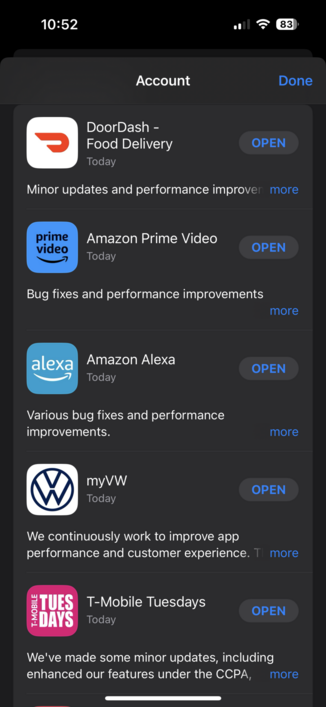
‘Tis the season for bug fixes and performance updates, looks like. #appupdates #releasenotes
OMG! Ubuntu! · @omgubuntu
390 followers · 788 posts · Server hello.2heng.xin
Vivaldi Browser Now Boasts Mastodon Integration
Mastodon is now baked into the latest builds of the Vivaldi web browser. Folks are flocking to this federated social networking service in droves of late, a trend Vivaldi is well aware of. Such keen supporters of decentralised social media, they even launched their own Mastodon instance “Vivaldi Social” a few weeks back. Now they take things a step further by integrating Mastodon inside of the browser itself. Don’t panic if you don’t like the sound of this: it’s a discrete implementation that is easy to ignore or not use. Like Vivaldi’s other bells and whistles — spanning everything from :sys_more_orange:
#News #AppUpdates #Mastodon #Vivaldi #WebBrowsers
:sys_omgubuntu: https://www.omgubuntu.co.uk/2022/12/vivaldi-browser-adds-mastodon-integration
#news #AppUpdates #Mastodon #Vivaldi #webbrowsers
OMG! Ubuntu! · @omgubuntu
383 followers · 783 posts · Server hello.2heng.xin
Open Source Photography App ‘RawTherapee’ Gets Big Update
Rawtherapee 5.9 is out. New features and expanded camera support ship in this update to the open-source photo editor. Learn more about what's changed.
#Apps #News #AppUpdates #ImageEditors #Rawtherapee
:sys_omgubuntu: https://www.omgubuntu.co.uk/2022/12/rawtherapee-5-9-available-to-download
#Apps #news #AppUpdates #ImageEditors #rawtherapee
OMG! Ubuntu! · @omgubuntu
380 followers · 780 posts · Server hello.2heng.xin




20 Years After Its Debut, ClamAV Finally Hits Version 1.0
Does Ubuntu need anti-virus software? The general answer is no, but that doesn’t mean it’s not wise to use some to run a check every now and then. Most folks’ go-to is open source anti-virus ClamAV, an app dedicated to ‘detecting trojans, viruses, malware, and other malicious threats’. ClamAV is available for Windows, macOS, BSD, and Linux systems, making it especially well suited to those who regularly work cross-platform and want some degree of familiarity. And a rather special new version was released this week. ClamAV 1.0 is an LTS Release The first version of ClamAV, which is developed by :sys_more_orange:
#News #Antivirus #AppUpdates #Clamav
:sys_omgubuntu: https://www.omgubuntu.co.uk/2022/11/20-years-after-its-debut-clamav-finally-hits-version-1-0
#news #antivirus #AppUpdates #clamav