
Mitch! ☁️ :debian: :steamdeck: · @msprout
480 followers · 2699 posts · Server fosstodon.orgFun new trick I learned — use TexTuring (a halftone generator that uses organic patterns) to create very convincing grain on compositions.
Here is one of the gradients I made if you wanna fiddle with it.
https://mitch.us-east-1.linodeobjects.com/misc/Layer%201_TexTuring-5738.png
Mitch! ☁️ :debian: :steamdeck: · @msprout
459 followers · 2422 posts · Server fosstodon.orgIf you work in Adobe Illustrator and aren't using Astute Graphics, you're missing out. I can hardly work anymore without these handy professional tools.
Mitch! :debian: ☁️ · @msprout
337 followers · 1836 posts · Server fosstodon.org
Mitch! :debian: ☁️ · @msprout
265 followers · 1260 posts · Server fosstodon.org
Needed a stock image of driving rain for the background of a youtube thumbnail — #stablediffusion to the rescue! It can really come in clutch when you need a REALLY specific, otherwise non-unique image input for a composition.
For situations when you really just need an image that can pass a smell test, this is an invaluable tool.
#stablediffusion #design #DesignTips
Mitch! :debian: ☁️ · @msprout
265 followers · 1260 posts · Server fosstodon.org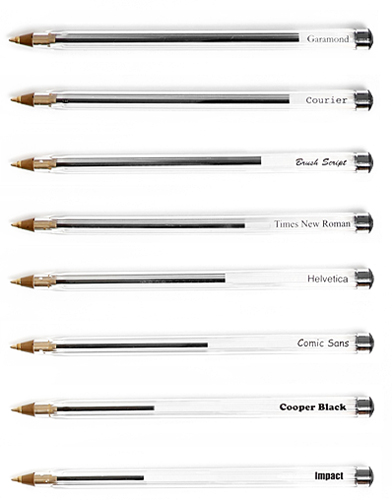
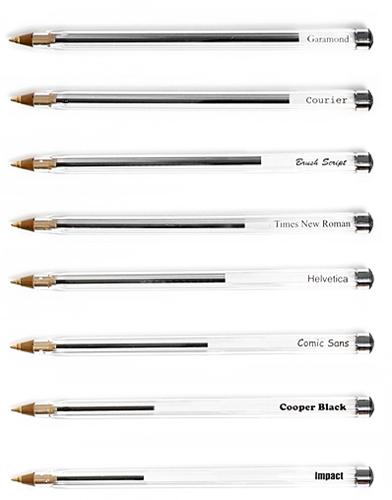
Which type face uses the most ink when written by hand?
Source: https://flowingdata.com/2010/01/29/save-pens-use-garamond-font/
Mitch! :debian: ☁️ · @msprout
247 followers · 1172 posts · Server fosstodon.org


This halftone tool is really neat — and it outputs to an optimized #SVG! #designtips
Mitch! :debian: ☁️ · @msprout
222 followers · 1015 posts · Server fosstodon.orgJust published a writeup + the model files for an AI-powered design tool I built mainly for myself, ‘LogoScale.’
Its purpose is upscale shitty, tiny, compressed raster logos up to 4x or 8x their size, to augment and increase the accuracy of bitmap tracing. This is how you go from ‘re-tracing client logos by hand’ to ‘I pulled a vector logo out of my ass’. Take a peek.
#ESRGAN #artificialintelligence #design #DesignTips #floss
Mitch! :debian: ☁️ · @msprout
162 followers · 674 posts · Server fosstodon.orgDid you know that Adobe Illustrator accepts plaintext SVG input via the clipboard? It can save you a number of steps when you're trying to pull a logo off a site to use. Just open dev tools via right click-> inspect, copy the SVG element, and just paste into Illustrator.