
OSTechNix · @ostechnix
626 followers · 1644 posts · Server floss.socialHow To Install And Use Terminator Terminal Emulator In Linux #Terminator #Terminalemulator #Linuxterminal #Tilingterminal #Opensource #Python #Linuxhowto #Linux
https://ostechnix.com/terminator-terminal-emulator/
#terminator #TerminalEmulator #linuxterminal #tilingterminal #OpenSource #Python #linuxhowto #Linux
OSTechNix · @ostechnix
622 followers · 1620 posts · Server floss.socialHow To Install And Configure Alacritty Terminal Emulator In Linux #Alacritty #TerminalEmulator #LinuxTerminal #Terminal #Rust #Opensource #Linux
https://ostechnix.com/alacritty-terminal-emulator/
#alacritty #TerminalEmulator #linuxterminal #terminal #Rust #OpenSource #Linux

Akib Azmain Turja · @akib
171 followers · 1552 posts · Server hostux.social@hispa I love Eat, BTW. Fastest full-fledged pure #EmacsLlisp #terminal emulator, with #mouse support and fancier shell integration.
#emacsllisp #terminal #mouse #emacs #elisp #TerminalEmulator

heise online · @heiseonline
39712 followers · 1514 posts · Server mastodon.social
Linux: Farbige Terminalausgabe in less
Damit die Terminalausgabe lesbar ist, verwende ich die Option "--color", aber es bleibt alles schwarz-weiß. Was muss ich machen, damit "less" funktioniert?
#LESS #LinuxundOpenSource #Spielkonsolen #Terminal #TerminalEmulator #Terminalausgabe #Tipps&Tricks
#less #linuxundopensource #spielkonsolen #terminal #TerminalEmulator #terminalausgabe #tipps

pablolarah · @pablolarah
92 followers · 652 posts · Server mastodon.social
🟩 Termino.js
Create a web based terminal on any website - great for games, animations and real world apps!
#terminalEmulator #webdev #js

@reiver ⊼ (Charles) :batman: · @reiver
500 followers · 2695 posts · Server mastodon.social
@reiver ⊼ (Charles) :batman: · @reiver
587 followers · 2900 posts · Server mastodon.social
@reiver ⊼ (Charles) :batman: · @reiver
481 followers · 2449 posts · Server mastodon.social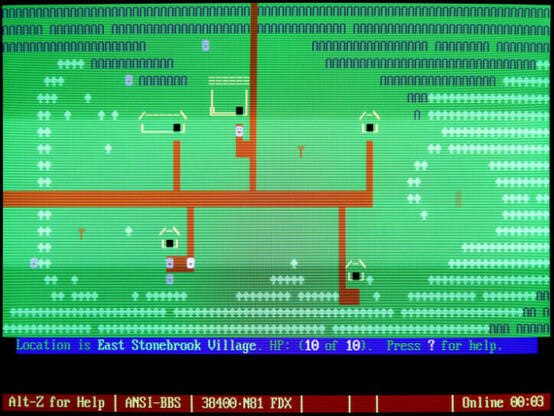
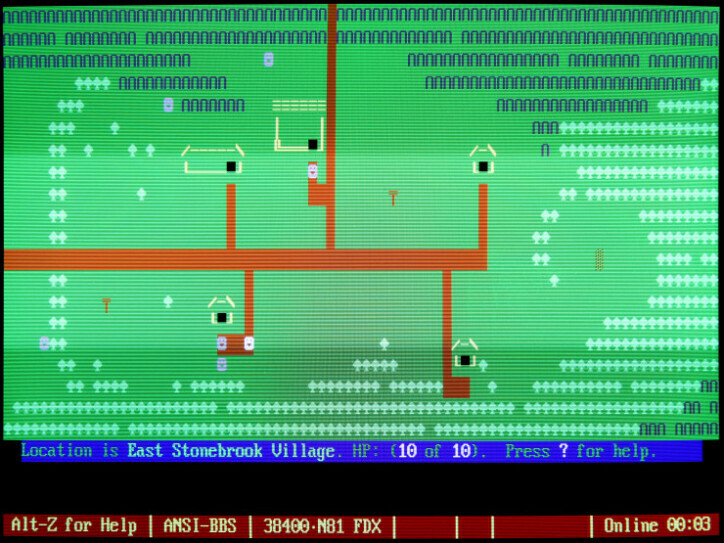
The Forgotten World of BBS Door Games
https://www.pcmag.com/news/the-forgotten-world-of-bbs-door-games
( #bbs #computerTerminal #doorGames #gaming #history #retroComputing #retroGaming #terminalEmulator #videoGames #vintageComputing #vintageGaming )
#bbs #computerterminal #doorgames #gaming #history #retrocomputing #retrogaming #TerminalEmulator #videogames #vintagecomputing #vintagegaming
@reiver ⊼ (Charles) :batman: · @reiver
587 followers · 2900 posts · Server mastodon.socialThe Forgotten World of BBS Door Games
https://www.pcmag.com/news/the-forgotten-world-of-bbs-door-games
by @benjedwards
( #bbs #computerTerminal #doorGames #gaming #history #retroComputing #retroGaming #terminalEmulator #videoGames #vintageComputing #vintageGaming )
#bbs #computerterminal #doorgames #gaming #history #retrocomputing #retrogaming #TerminalEmulator #videogames #vintagecomputing #vintagegaming
Akib Azmain Turja · @akib
64 followers · 582 posts · Server hostux.socialI have written a new #Emacs #TerminalEmulator, #Eat. It can also be embedded in #Eshell, my favorite shell. It supports mouse, clipboard. And on my computer, it's faster than #Vterm in most cases, because #Eat flickers much less. I started it more than three months ago, and now I'm using it on daily basis for about a month, and it works fine.
README: https://codeberg.org/akib/emacs-eat
Blog post: https://akib.codeberg.page/blog/introducing-eat.html
#emacs #TerminalEmulator #Eat #eshell #vterm #terminal
Akib Azmain Turja · @akib
51 followers · 351 posts · Server hostux.social#EmacsTip: Do want the power of Emacs in your shell? Enter #ShellMode, a specialized mode for command shell. It allows you to write shell command, run Emacs commands on your incomplete shell command and output. Before you say that it isn't a proper terminal emulator, I would like say, it is! With #Coterm, you can run any full screen terminal program in #ShellMode.
Shell: https://www.gnu.org/software/emacs/manual/html_node/emacs/Interactive-Shell.html
Coterm: https://elpa.gnu.org/packages/coterm.html
#emacstip #ShellMode #Coterm #emacs #shell #comint #terminal #TerminalEmulator

David Bremner · @bremner
390 followers · 2867 posts · Server mathstodon.xyzI switched from urxvt to kitty for better colour support. I have my doubts that terminal should have this many features, but oh well. Switching to xterm doesn't seem like a win, security-wise. Current annoyances: what is this term=xterm-kitty nonsense? Am I really supposed to update terminfo on every machine I login to? Probably there is a configuration that I was too lazy to look for...
#TerminalEmulator #Linux #SysAdmin
#sysadmin #linux #TerminalEmulator

JoergSorge · @JoergSorge
322 followers · 2187 posts · Server social.bau-ha.us#gpg auf nem nicht gerootetem #Android im #TerminalEmulator, wie macht ihr das? Oder gibts ne #App?
#FollowerPower
#GPG #android #TerminalEmulator #app #followerpower

🍥MEU REFÚGIO NERD🍥 · @MeuRefugioNerd
502 followers · 5599 posts · Server mastodon.com.br
dnkl :emacs: · @dnkl
281 followers · 968 posts · Server linuxrocks.online#foot 1.10.3[^1] is out!
This release finishes the kitty keyboard protocol work that 1.10.2 started.
We also have a couple of crash fixes.
If you are using full-screen applications that makes use of OSC-8 URLs (for example, senpai[^2]), you *definitely* want to update...
[^1]: https://codeberg.org/dnkl/foot/releases/tag/1.10.3
[^2]: https://git.sr.ht/~taiite/senpai
#TerminalEmulator #terminal #wayland #foot
dnkl :emacs: · @dnkl
281 followers · 968 posts · Server linuxrocks.onlineFoot-1.10.0 is out! 🎉
#foot #TerminalEmulator #wayland

Boiling Steam · @boilingsteam
2991 followers · 7723 posts · Server mastodon.cloud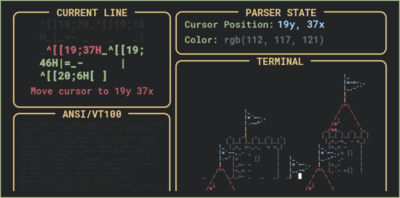



Anatomy of a Terminal Emulator: https://www.poor.dev/terminal-anatomy/ #linux #terminal #terminalemulator #anatomy #howitworks
#terminal #TerminalEmulator #anatomy #linux #howitworks
dnkl :emacs: · @dnkl
281 followers · 968 posts · Server linuxrocks.online#foot 1.9.0 is out!
#TerminalEmulator #terminal #wayland #foot
dnkl :emacs: · @dnkl
281 followers · 968 posts · Server linuxrocks.online#foot 1.8.2 is out 🎉
This release brings a couple of memory usage improvements, and fixes for memory leaks.
But (almost) more importantly, it has an improved renderer that handles "overflowing", or "bleeding" glyphs. This includes certain "wide" italic fonts, where the glyphs "lean" into the next cell, icon fonts, and legacy single-width emojis.
This supersedes the tweak.allow-overflowing-double.width-gyphs" hack.
#TerminalEmulator #terminal #wayland #foot
dnkl :emacs: · @dnkl
281 followers · 968 posts · Server linuxrocks.online#foot 1.8.0 is out 🎉
Highlights:
* Grapheme shaping (i.e. emoji sequences)
* XDG activation support ("urgency")
* -o,--override command line option to set/override foot.ini options
* Much improved performance of interactive window resize
* Tabs are now preserved when copying text
* Blend sixels emitted on top of each other
... and lots more: https://codeberg.org/dnkl/foot/releases/tag/1.8.0
#sixel #terminal #TerminalEmulator #wayland #foot