
Bok · @bok
33 followers · 223 posts · Server lor.shAlso, when my mother died, I moved the TV she used to watch HGTV and such in the living room to the den where my father watched sports. So he has two TV there, one set to cable input, one set to #NvidiaShield input. So it's not like he has to deal with switching inputs, which he also couldn't master. Now he can have two ball games on at the same time, both muted, because he thinks announcers are idiots.
Bok · @bok
30 followers · 204 posts · Server lor.sh#YouTube #ReVanced Extended is a dead parrot, according to a forum I found. However, a version of non-Extended ReVanced is working. Not as well, though. For example, beneath the timeline on a video, there are buttons for Comments and Details and such. Those buttons work in #Extended, while in plain RV they don't. Clicking them on TV merely makes the line of buttons disappear, and they do nothing.
But one thing that does work in RV is my YouTube account. That's a big deficit in #PipePipe and #NewPipe. If I see a video worth watching while I'm on my PC, I add it to my #WatchLater queue. Ditto if I'm on my tablet. Then later I can watch it on TV via #NvidiaShield.
That fails without an account. Without a shared account, devices are separated. If I add a video to a playlist on tablet, that has zero effect on my TV box, which seriously cramps my flow. I'd have to save links of vids I wanted to watch later to some other app, and transfer them to my Shield in the evening. I probably will make a copy of my subscriptions and saved playlists in PipePipe, even if I can't get #SponsorBlock to work there. Good to have a backup in case RV dies like RVX did. It will take many hours over several days, however.
#youtube #revanced #extended #pipepipe #newpipe #watchlater #nvidiashield #sponsorblock
Bok · @bok
30 followers · 193 posts · Server lor.sh#YouTube #ReVanced Extended no longer works for me. Not on phone, or tablet, or #NvidiaShield. It will play the first 1:08 of a video, then just sit paused, spinning its wait circle.
Updated to the latest version from today, 18.27.36, still no go. Changed "spoof player parameter" as the forum advised: no change. Force stopping the app and then playing a video again gets a couple more seconds, then the video stops again.
Tomorrow I'll try various uninstalls, reinstalls, versions, and other apps. Something better work, because I watch a *lot* of YouTube, like four or five hours per day. Up till now, with no ads, either YT-inserted or host-inserted.
#youtube #revanced #nvidiashield
Bok · @bok
27 followers · 149 posts · Server lor.sh
Three weeks ago #YouTube messed with my modus operandi for watching videos by removing the #WatchLater icon from videos. However, they left the empty spaces where the icons were in place, so I could still move videos to the Watch Later list and then watch them at night on TV via my #NvidiaShield.
Today I note that the Watch Later button is entirely gone. So unless I want to start each video individually (then wait for it to load, then click Overflow, Save, Watch Later), I'm stuck. Basically the website is now useless to me, and I'll queue videos for TV viewing using #ReVanced Extended on my tablet instead.
#youtube #watchlater #nvidiashield #revanced

Matt Brunt · @brunty
415 followers · 1769 posts · Server brunty.social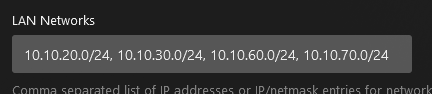
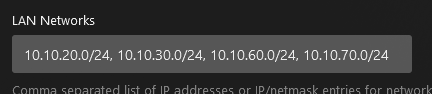
Have I just spent an hour try to debug why local devices (#PlayStation5, #NvidiaShield) were remote streaming from #Plex rather than local access even with subnets set in the Plex local network settings?
Yes.
Did I try adjusting multiple firewall rules because those devices are on a different VLAN to the server and more restricted thinking that it was causing the issues?
Yes.
Did I then realise I'd put spaces into my subnet masks and simply removing them fixed all the problems?
Yes.
#playstation5 #nvidiashield #plex #sigh

Andrzej · @AJSWritesthings
274 followers · 864 posts · Server writing.exchangeGuy who finally upgraded to a 50 inch 4K TV only to realize, thanks to the increased fidelity, that his #NvidiaShield can't handle frame rate switching
(it is me, I am the guy)

Bob Harvey · @BobHarvey
94 followers · 1577 posts · Server twit.social
This is depressingly accurate. Worth reading
https://www.theverge.com/23621907/streaming-tv-boxes-roku-amazon-google-apple-nvidia . by David Pierce at The Verge.
I have an Nvidia Shield, and the streaming performance is superb. But the UI is awful, the speed of selecting apps/content mind-numbingly tedious. The remote is awful, & app on my phone unfathomable.
I use it as a casting client. Find content on my phone and cast it to the shield. Anything else is insufferable.
#theverge #nvidiashield #streaming

Jesper Tingvall 🔜 GDC · @JesperTingvall
40 followers · 94 posts · Server mastodon.gamedev.placeSo my #Nvidiashield battery started to swell... Now considering using a #raspberrypi with #plexamp as sound system instead. Only question is how to play podcasts on it. Very sad Plex removed that feature
Any ideas how to workaround it?
#plexamp #raspberrypi #nvidiashield

C. Glen · @FilmOptimist
39 followers · 141 posts · Server bytetower.socialI picked up an NVIDIA Shield to run my new Plex server from and... I don't know why it didn't occur to me that it would need additional storage space to hold onto a library of any decent size.
But while I should have expected it, 12 GB *still* seems kind of puny for a media and gaming device.
#nvidiashield #plex #ineedspace #spaaaaace

Diogo Constantino · @DiogoConstantino
148 followers · 634 posts · Server masto.ptOra aí está mais um exemplo da importância dos protocolos abertos, do #SoftwareLivre e do #SelfHosting: O encerramento dos servidores da #NVIDIA Shield!
Felizmente para os donos destes dispositivos há o #Moonlight e o #Sunshine.
https://moonlight-stream.org/
https://github.com/LizardByte/Sunshine
#softwarelivre #selfhosting #nvidia #moonlight #sunshine #opensource #nvidiashield

Tarnkappe.info · @tarnkappeinfo
1688 followers · 3940 posts · Server social.tchncs.de
📬 GameStream: Nvidia deaktiviert lokales Spiele-Streaming
#Gaming #CloudGaming #GameStream #GeForcenow #GoogleStadia #Moonlight #Nvidia #NvidiaShield #SteamLink https://tarnkappe.info/artikel/gaming/gamestream-nvidia-deaktiviert-lokales-spiele-streaming-261245.html
#steamlink #nvidiashield #nvidia #moonlight #googlestadia #geforcenow #gamestream #cloudgaming #gaming
Tarnkappe.info · @tarnkappeinfo
1684 followers · 3937 posts · Server social.tchncs.de📬 GameStream: Nvidia deaktiviert lokales Spiele-Streaming
#Gaming #CloudGaming #GameStream #GeForcenow #GoogleStadia #Moonlight #Nvidia #NvidiaShield #SteamLink https://tarnkappe.info/artikel/gaming/gamestream-nvidia-deaktiviert-lokales-spiele-streaming-261245.html
#steamlink #nvidiashield #nvidia #moonlight #googlestadia #geforcenow #gamestream #cloudgaming #gaming

Mistial Developer · @mistial
24 followers · 44 posts · Server defcon.social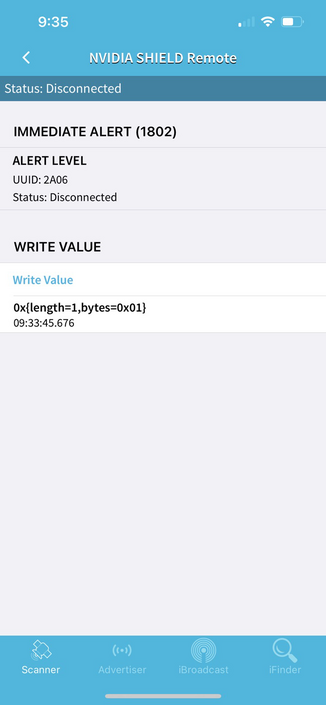

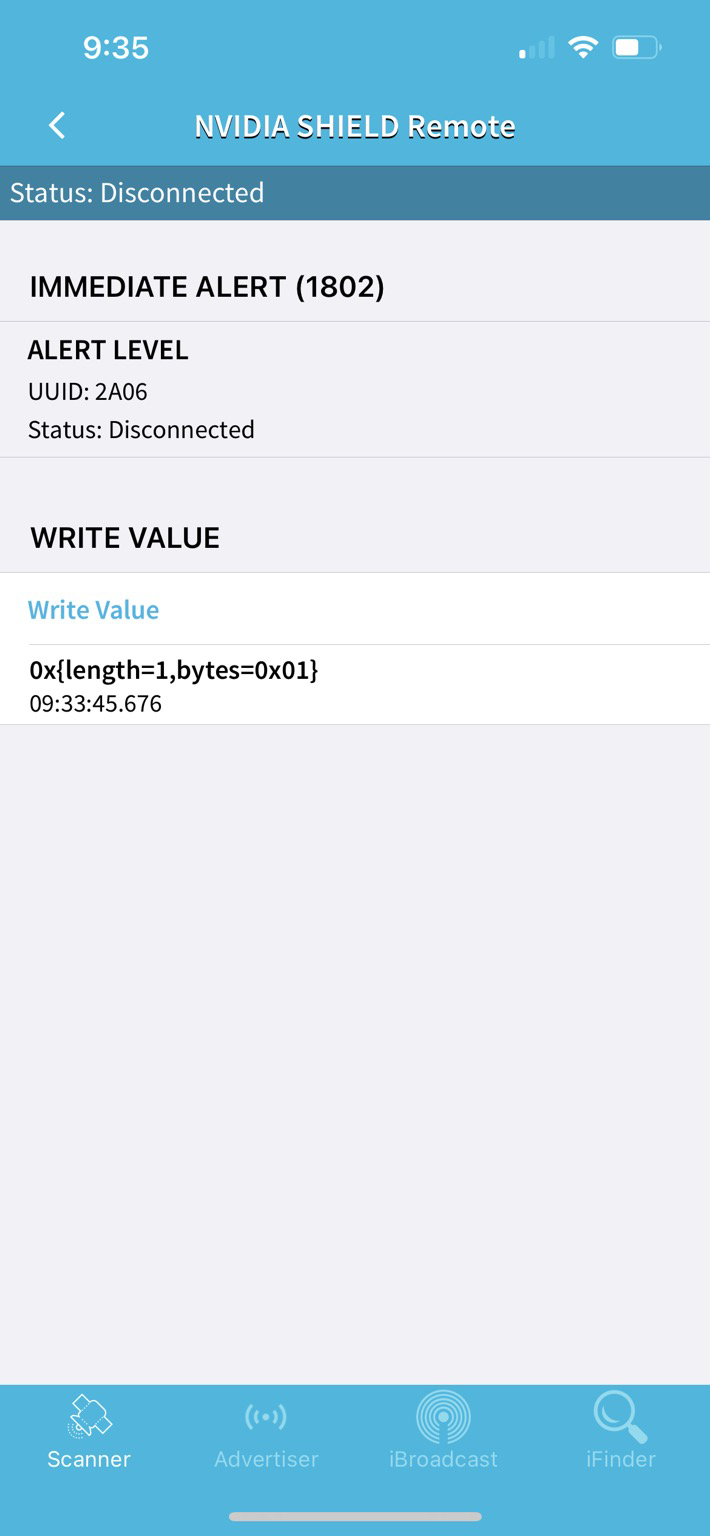
The #nVidiashield we have was inadvertently packed up in the wrong box in a shipping container. I remembered seeing a BLE signal from the remote previously, so I attempted to fox hunt it with a #BLE scanner.
After a little bit, I saw that it offered a service (immediate alert), so I decided to try writing 01 to it. It immediately started playing SOS in Morse code.
Neat.

p̻̻̥r̥̻̥o̻j̤͛ec͔t̞dp :verifiedpurple: · @projectdp
376 followers · 208 posts · Server infosec.exchangeLooking for some advice regarding options for the home media center.
I'm running a NAS that has Plex server happily running on it but I noticed when playing videos on end devices it transcodes often and the transcoding is slow on the NAS which seems to be a common issue.
I'm looking to offload that work. I was thinking of setting up a SFF/MiniITX PC or piece of hardware that does transcoding well and simply install the Plex app and target the Plex server for data. I have a spare GPU I can use already if necessary. I also saw there are devices like the NVIDIA shield. I was thinking for this device it would simply need some GPU w/NVENC or Intel CPU w/QuickSync. Am I missing any options?
If I do go with the SFF/MiniITX build I would need a remote. I was thinking maybe the FLIRC receiver and a legacy remote. Any better options for that?
Lastly does it make sense to skip the Plex server and mount the media directly on either the SFF or NVIDIA Shield, sync the data every so often, and then transcode locally off faster disks? If so is it easy to get a shell or OS-level access on the Shield?
#media #mediapc #sff #nas #plex #miniitx #NVIDIA #nvidiashield #flirc #intel #transcoding #homelab #selfhosted #selfhosting
#media #mediapc #sff #nas #plex #miniitx #nvidia #nvidiashield #Flirc #intel #transcoding #homelab #selfhosted #selfhosting

Gwenn · @gwenn
113 followers · 1701 posts · Server social.dauen.name@chbmeyer
Ich habe auch noch nichts freies gefunden. Du kannst nur dumme Fernseher/Monitore kaufen und dann entweder Kodi betreiben oder ggf. #nvidiashield mit Einschränkungen...
@devinius

kingargyle · @kingargyle
12 followers · 51 posts · Server noc.socialThe only commonality amongst my various social media networks is that I always must find the #cats that are being posted.
On to other things anybody else notice that their #nvidiashield seems to not respond to #googleassistant commands. Sometimes it works other times it just ignores it. At least the #Sofabaton remote I have will turn on the tv through the shield and #cec.
#cats #nvidiashield #googleassistant #Sofabaton #cec

BjoernAusGE · @bjoerns
202 followers · 6035 posts · Server social.tchncs.deEs gibt schon Leute in der Kodinerds Community die sind echte Künstler.
Falls jemand noch nen Ständer für seine Nvidia Shield sucht:
#kodi #nvidiashield #shield #nvidia

Dan 🏳️🌈☁️ · @dmakovec
62 followers · 366 posts · Server aus.socialNot sure why, but controlling my #nvidiashield from #homeassistant via adb commands has always been extremely unreliable with regular dropouts between client and server. For remote control actions, it's actually faster and 100% reliable to get HA to send remote button push actions to the LG C1 TV and have it relay them back to the Shield via CEC .

Michał Narecki 🇵🇱 · @michal
352 followers · 1560 posts · Server 101010.plSo I've done some research and it turns out that I should either look for #nvidiashield or Samsung Galaxy Tab S2 (8' or 9.7' screen size version). But now I wonder: do I really need a tablet? Well, probably not right now but I love tinkering with this stuff.
Michał Narecki 🇵🇱 · @michal
352 followers · 1560 posts · Server 101010.plLet's say I want to buy a tablet and install #lineageos. Which (second-hand) device should I consider? Is #nvidiashield a good choice?